
How do I search for space availability
Your customers can easily search and find availability of your spaces
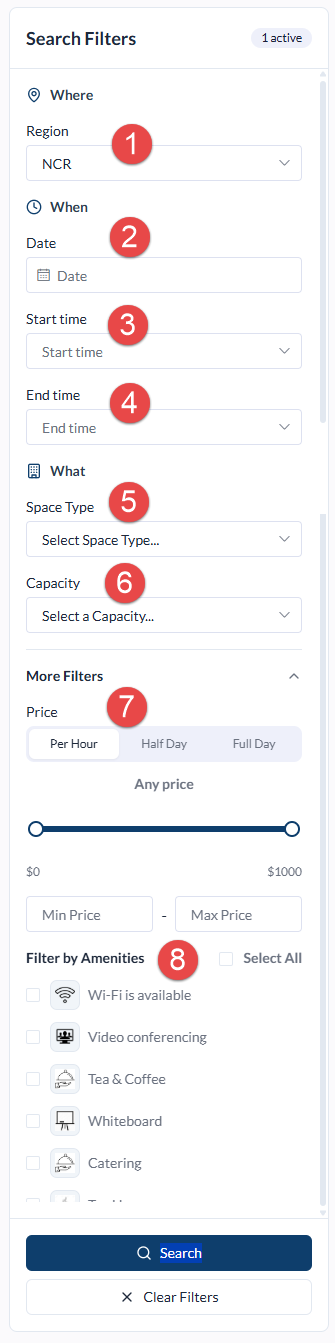
The Search Results Page allows a 'Booker' to refine their search based on their booking requirements.
The following filters are available:
- Region: If your organisation has Locations or Spaces across multiple Regions, Bookers can select their preferred Region from the available list, for example Sydney, Melbourne or New York.
- Date: Select the date on which the booking or event will take place.
- Start Time: Select the preferred start time for the booking.
- End Time: Select the preferred end time for the booking.
- Space Type: Select the type of Space required, for example Meeting Room, Training Room or Recreation Space.
- Capacity: Optionally specify the number of people the Space needs to accommodate.
- Price: Optionally filter the results based on budget or preferred price range.
- Amenities: Select any required Amenities or additional facilities to further refine the search results.
- Search: Once the required filters have been selected, click Search to display Spaces matching the selected criteria. If no exact matches are available, Meeting Hub will display suitable alternative options where available.